Style Syntax
AppConfig styles are plain JSON objects with a small amount of Hosanna-specific resolution syntax. The same rules are used by control styles, fragment styles, row settings, cell settings, and theme tokens.
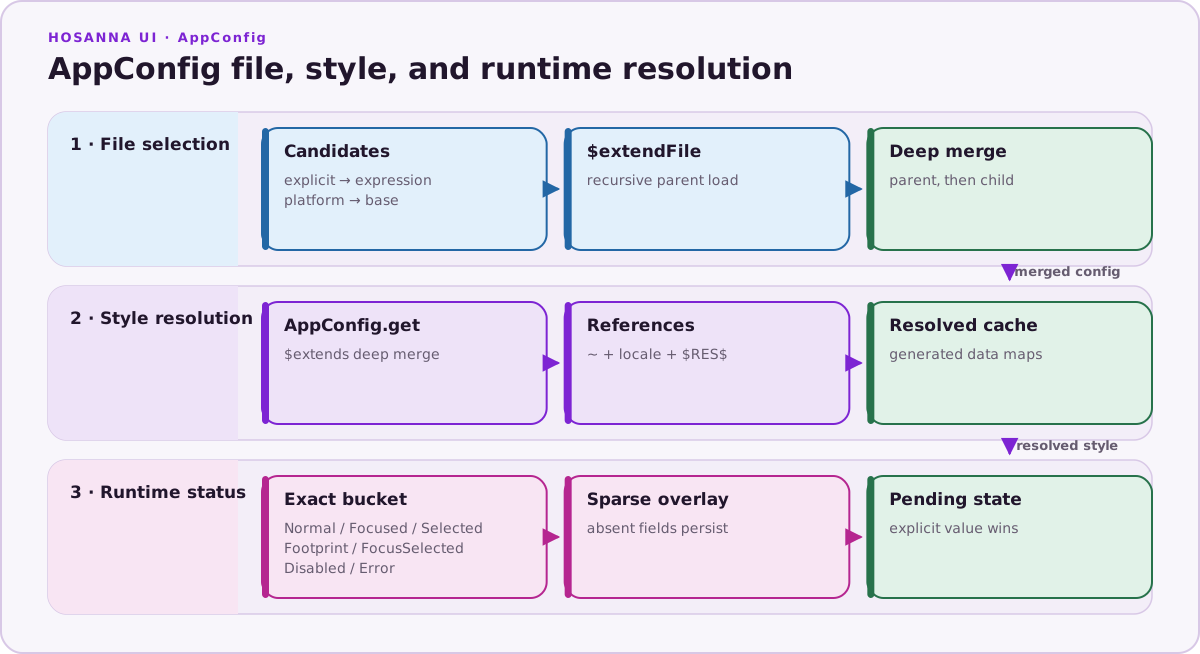
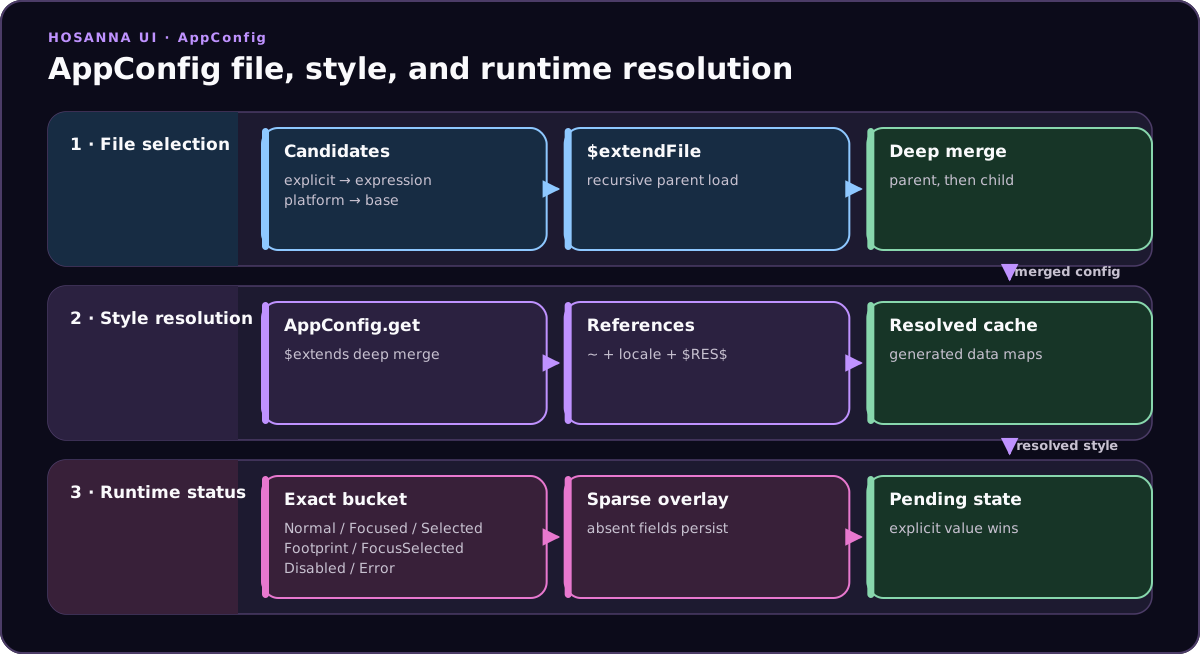
File merging, style/reference resolution, and runtime status overlays are separate stages. A status bucket changes only the fields it declares.
Style Keys
Views and controls usually reference styles by key:
Button({
  text: 'Continue',
  styleKey: 'controls.Button.primary',
});
The key points into assets/meta/app.config.json:
{
  "controls": {
    "Button": {
      "primary": {
        "normal": {
          "color": "~theme.colors.white",
          "titleFontKey": "~theme.fonts.text-bold-20"
        },
        "focused": {
          "color": "~theme.colors.blue400"
        }
      }
    }
  }
}
References
Use ~ to resolve another AppConfig path. References keep common tokens in one place and avoid copying raw colors, fonts, image paths, or nested style values.
{
  "theme": {
    "colors": {
      "textPrimary": "#ffffff"
    },
    "fonts": {
      "body": "pkg:/assets/fonts/Poppins-Regular.ttf, 24"
    }
  },
  "controls": {
    "Label": {
      "default": {
        "normal": {
          "fontKey": "~theme.fonts.body",
          "color": "~theme.colors.textPrimary"
        }
      }
    }
  }
}
Inheritance
Use $extends when a style should derive from another style and override only the fields that differ.
{
  "controls": {
    "Button": {
      "primary": {
        "normal": { "color": "~theme.colors.white" }
      },
      "danger": {
        "$extends": "controls.Button.primary",
        "normal": { "color": "~theme.colors.red500" }
      }
    }
  }
}
The extending object is deep-merged over the base object. Use this for named variants, not for per-row runtime data; CollectionView rows should use settingsOverrides for one-off row changes.
State Buckets
Stateful styles group properties by UI state (ViewStatus). When the status changes, Hosanna applies only the fields declared in that status bucket—it does not reset props that are missing from the new bucket.
Rule: If a prop differs between normal and another bucket, list that prop in every bucket with the value you want for that status.
Problematic Pattern
This style looks reasonable, but it omits props from buckets where you expect the default value to return:
{
  "normal": {
    "opacity": 0.8
  },
  "focused": {
    "opacity": 1,
    "scale": [1.05, 1.05]
  },
  "selected": {
    "borderColor": "~theme.colors.accent"
  },
  "disabled": {
    "opacity": 0.35
  }
}
What goes wrong:
normal→focused→normal:scalestays[1.05, 1.05]becausenormalnever sets it back to[1, 1].focused→selected:opacitystays1andscalestays[1.05, 1.05]even if you expected selected to look different.selected→disabled:borderColorcan remain the accent color becausedisableddoes not override it.
Only keys present in the active bucket are applied; missing keys keep whatever value the view already had.
Correct Pattern
Repeat every prop that changes across statuses in each bucket:
{
  "normal": {
    "borderColor": "~theme.colors.white",
    "opacity": 0.8,
    "scale": [1, 1]
  },
  "focused": {
    "borderColor": "~theme.colors.white",
    "opacity": 1,
    "scale": [1.05, 1.05]
  },
  "selected": {
    "borderColor": "~theme.colors.accent",
    "opacity": 1,
    "scale": [1, 1]
  },
  "disabled": {
    "borderColor": "~theme.colors.white",
    "opacity": 0.35,
    "scale": [1, 1]
  }
}
Now normal → focused → normal restores opacity, scale, and borderColor because each transition applies a complete set of values for that status.
Common buckets include normal, focused, focusFootprint, selected,
focusSelected, disabled, and error where a control or fragment host
supports them. Fragment cell styles also use views.base for the initial tree
and state buckets for updates to existing fragment children; the same
explicit-per-bucket rule applies to fragment child field updates.
Config Variants
Expression-specific files can extend a base config:
{
  "$extendFile": "app.config.json",
  "theme": {
    "fonts": {
      "body": "pkg:/assets/fonts/Poppins-Regular.ttf, 18"
    }
  }
}
Use variants for expression or device differences that should be selected at launch, such as phone, TV, web, or native differences. See Cross-Platform Runtime Model for the runtime selection model.
Where To Go Next
- Use Fragments for fragment trees, constraints, data maps, and callbacks.
- Use Fragment Constraints for fragment layout authoring, explicit rules, and runtime behavior.
- Use the Fragment Constraint Catalog for exact inline function signatures and examples.
- Use Fragment Computed Values for computed fragment fields and numeric constraint arguments.
- Use Cells for
DynamicCellcontent. - Use Rows for CollectionView row layout and overrides.