View Fragments
Fragments are reusable view trees defined in AppConfig. DynamicCell uses them for CollectionView cells, and FragmentView can mount the same fragment model directly in a screen or control.
If this is your first fragment, start with Build Your First View Fragment.
A fragment style has three main parts:
views.base: the SG child nodes created when the fragment is allocated.- Status styles such as
views.normal,views.focused,views.focusFootprint,views.selected,views.focusSelected,views.disabled, andviews.error: field overlays applied to existing child nodes when the fragment status changes. - Optional
$supportsDataMap, data bindings, function bindings, constraints, and callbacks: runtime behavior that connects row data or host view data to the fragment. - Optional computed values: declarative primitive values that can drive fragment fields and numeric constraint arguments.
Fragments are resolved through AppConfig.get(styleKey), then created and pooled by ViewFragmentProvider. The provider keeps fragments by styleKey, reuses released fragments, tracks child views by id, and falls back to cells.missingCell when an unknown cell style is requested and that fallback exists.
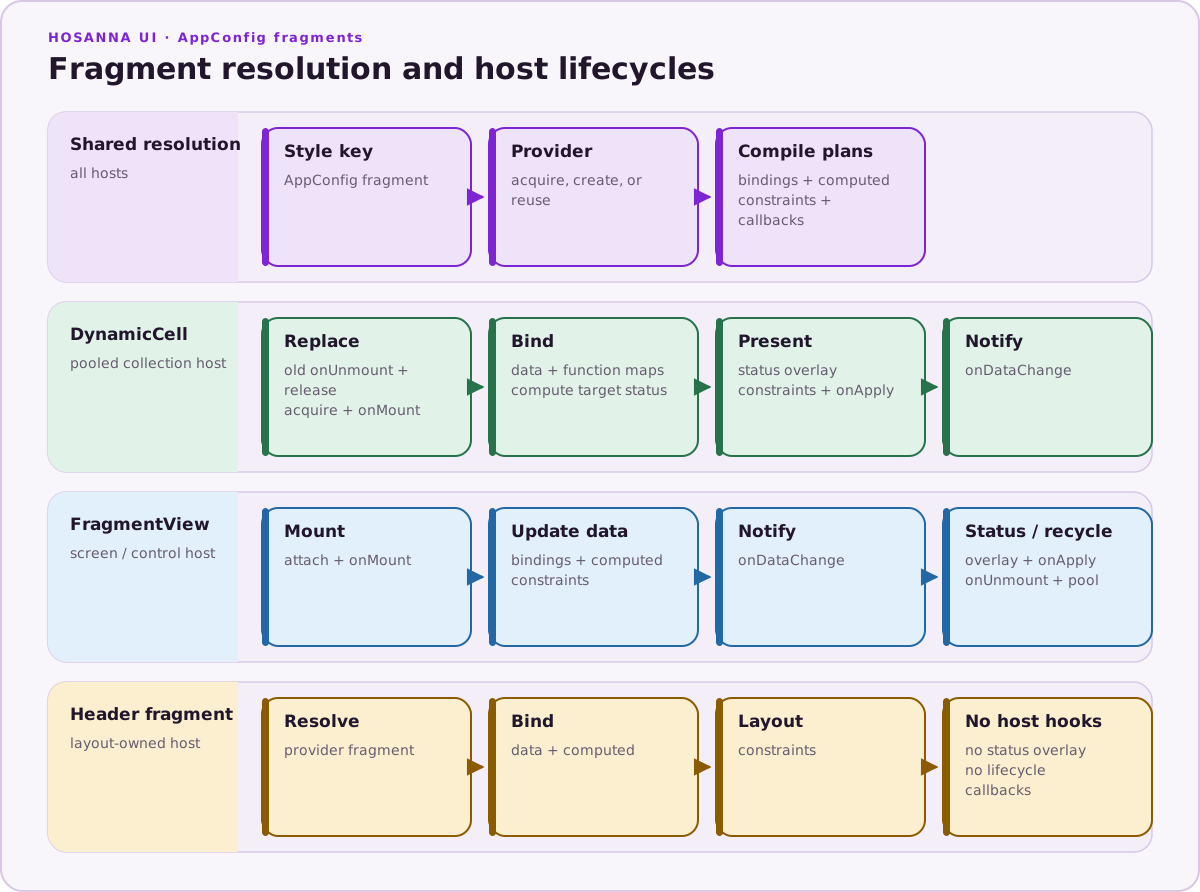
AppConfig and the provider share fragment resolution and compilation, while each host owns its binding, status, callback, constraint, and pooling order.
Choose the Right Guide
| Goal | Guide |
|---|---|
| Build and mount one working fragment | Build Your First View Fragment |
| Bind item data or calculate one field | Fragment Bindings |
| Derive declarative values from data, size, focus, or device inputs | Fragment Computed Values |
| Relate child positions and sizes | Fragment Constraints |
| Look up an inline constraint signature or diagram | Fragment Constraint Catalog |
| Register callbacks and understand host lifecycle | Fragment Callbacks and Lifecycle |
| Mount a fragment outside CollectionView | FragmentView |
| Select cell fragments from rows and items | Cells |
| Diagnose reuse or enable layout caching | Fragment Performance and Debugging |
Fragment Shape
{
  "cells": {
    "hero": {
      "$supportsDataMap": true,
      "id": "heroCell",
      "views": {
        "base": [
          {
            "id": "poster",
            "subType": "Poster",
            "width": 384,
            "height": 216,
            "uri": "${data.imageSet.$RES$}"
          },
          {
            "id": "title",
            "subType": "Label",
            "fontKey": "~theme.fonts.heading-32",
            "text": "${data.title}",
            "translation": [0, 230],
            "width": 384
          }
        ],
        "normal": {
          "poster": { "opacity": 0.85 },
          "title": { "color": "~theme.colors.white" }
        },
        "focused": {
          "poster": { "opacity": 1, "scale": [1.05, 1.05] },
          "title": { "color": "~theme.colors.accent" }
        },
        "selected": {
          "poster": { "opacity": 0.95 }
        },
        "disabled": {
          "poster": { "opacity": 0.4 },
          "title": { "color": "~theme.colors.disabledText" }
        }
      }
    }
  }
}
Every child in views.base that should receive status updates, data updates, or callback-driven updates needs a stable id. ViewFragmentProvider builds viewsById from those IDs; duplicate IDs make later updates ambiguous.
views.base is applied once when the fragment view is created. It must contain
the complete initial normal appearance. A newly created DynamicCell fragment
can already have normal status, so it does not necessarily apply
views.normal on its first bind.
Status sections are sparse maps from child ID to SG field updates. When
applyViewStatus(fragment, status) runs, the provider resolves
${styleKey}.views.${status} and updates only the fields declared for that
status. Status overlays do not undo prior overlays: views.normal must restore
every field changed by focused, selected, focusSelected, disabled, or
error.
views.base can contain nested children. The provider indexes descendants,
not only direct children, but every addressable ID must remain unique within
the fragment.
Dynamic Bindings
$supportsDataMap enables ${...} bindings inside fragment field values. During AppConfig resolution, those bindings are removed from the static views.base fields and stored in the fragment's internal data map. At runtime, DynamicCell and FragmentView call applyDataMap(fragment, data) to update the target child fields from the current content.
Use data bindings for direct field updates:
{
  "id": "poster",
  "subType": "Poster",
  "uri": "${data.imageSet.$RES$}",
  "width": 384,
  "height": 216
}
The path after data. is read from the row item or FragmentView data object. Array-style paths are normalized into dot paths, so ${data.images[0].url} is tracked as images.0.url. When $RES$ appears inside a data binding path, AppConfig replaces it with the current resolution suffix, such as fhd, hd, or sd.
Use fn bindings when a field must be computed rather than copied directly:
{
  "id": "progress",
  "subType": "Rectangle",
  "height": 8,
  "width": "${fn.progressWidth(320)}"
}
The function name must be registered as an onSpecificViewDataChange callback. AppConfig parses the function name and arguments, and applyDataMap calls the registered function with (data, childView, field, args). The return value is assigned to that field.
Function arguments support booleans, null, undefined, quoted strings, and numbers:
{
  "width": "${fn.metricWidth(320, 'compact', true)}"
}
Bindings must occupy the whole field value and belong to identified children
in views.base. They are one-way assignments when the host applies data; they
are not string interpolation or two-way observation. See
Fragment Bindings for missing-path
behavior, supported function arguments, unsupported binding forms, and the
current $extends limitation.
Fragment Constraints
Fragment constraints let AppConfig reposition and resize fragment children after the fragment is mounted or its data changes. The usual authoring form is an inline {{constraint.*(...)}} binding on width, height, x, y, or translation; AppConfig compiles those bindings into _dataMap.constraints.
Use Fragment Constraints for authoring, explicit rule shape, priorities, and runtime semantics. Use the Fragment Constraint Catalog to look up individual functions and visual examples.
Constraint Layout Caching
Fragments whose constraint results are stable can opt into layout caching:
{
  "cells": {
    "cachedHero": {
      "$supportsDataMap": true,
      "width": 640,
      "height": 360,
      "cacheFragmentConstraintLayout": true,
      "views": {
        "base": [
          { "id": "poster", "subType": "Poster", "width": "{{constraint.fillX(left, cell.right, 0, 0)}}" }
        ],
        "normal": {}
      }
    }
  }
}
cacheFragmentConstraintLayout lets hosts replay constraint writes for pooled
fragment instances. The runtime automatically separates rules without
computed arguments from rules that need the computed-value signature.
Enable it only when callbacks, measured item content, and status overlays do
not change geometry outside the tracked constraint inputs. The public
cacheFragmentConstraintLayoutKeyMode style field is not currently consulted
by DynamicCell or FragmentView; do not rely on it to change runtime key
behavior. See
Fragment Performance and Debugging
for the cache boundaries.
contentHeightAnchorViewId makes the fragment host height follow the bottom edge of a measured child after data-map and constraint application, then applies constraints again. Use it for variable-height content where rules anchored to cell.bottom must match the measured content height.
Fragment Callbacks
Fragments can declare lifecycle, status, and data callbacks in AppConfig. Register callback names with ViewFragmentProvider, then reference those names from the fragment style.
{
  "callbacks": {
    "onMount": ["prepareCard"],
    "onDataChange": ["layoutMetadata"],
    "onUnmount": ["releaseCardResources"]
  }
}
import {
  ViewFragmentCallbackType,
  type ViewFragmentCallbackHandler,
  type ISpecificViewFragmentCallbackHandler,
} from '@hs-src/hosanna-ui/views/lib/AppConfig';
import type { IViewFragmentProvider } from '@hs-src/hosanna-ui/views/lib/ViewFragmentProvider';
import { AppUtils } from '@hs-src/hosanna-bridge-core/AppUtils';

const provider = AppUtils.resolve<IViewFragmentProvider>('viewFragmentProvider');

provider.registerViewFragmentCallback<ViewFragmentCallbackHandler>(
  ViewFragmentCallbackType.OnDataChange,
  'layoutMetadata',
  (host, fragment, data, status) => {
    const title = fragment.viewsById.title;
    const background = fragment.viewsById.background;
    background.width = title.localBoundingRect().width + 40;
  }
);

provider.registerViewFragmentCallback<ISpecificViewFragmentCallbackHandler>(
  ViewFragmentCallbackType.OnSpecificViewDataChange,
  'progressWidth',
  (data, child, field, args) => {
    const fullWidth = args[0] as number;
    return fullWidth * Number(data.progress ?? 0);
  }
);
Supported callback groups:
| Callback | Handler arguments | When it runs |
|---|---|---|
onMount | (host, fragment, data, status) | After a fragment view is attached to a DynamicCell or FragmentView host. |
onUnmount | (host, fragment, data, status) | Before a fragment is released back to the provider pool. |
onApplyViewStatus | (host, fragment, data, status) | After a status style such as normal, focused, selected, or disabled is applied. |
onDataChange | (host, fragment, data, status) | After the host's data update pass; computed/constraint ordering varies by host. |
onSpecificViewDataChange | (data, childView, field, args) | Registered on the provider and invoked by ${fn.name(...)} bindings during applyDataMap. The return value becomes the field value. |
Use direct ${data.*} bindings for copied values such as text, image URI, opacity, or dimensions. Use onDataChange when the update needs multiple child views, measurement, host cell dimensions, or layout side effects. Use onSpecificViewDataChange when a single field should be computed from item data.
Use Fragment Computed Values when a single field can be derived declaratively from item data, cell size, focus state, screen size, or safe-area insets.
Callback arrays participate in $extends merging. If an extending fragment defines a new callback group, it is added. If it defines the same callback group as the base style, that group is replaced.
Register names before the first fragment instance is acquired. A missing regular callback name is logged and stored as a no-op on that hydrated instance. Callback exceptions are not caught by the provider. See Fragment Callbacks and Lifecycle for callback ordering, host differences, pooled cleanup, and status restoration.
Fragment Lifecycle
For CollectionView cells, DynamicCell manages fragment lifecycle:
- Choose the style key from the row, loading item, or item-level
cellSettingsKey. - Release the previous fragment and run
onUnmountif the style or row container changed. - Get a fragment from
ViewFragmentProvider, reusing a pooled fragment when available. - Append the fragment view to the row container and run
onMount. - Apply the data map from the current item.
- Apply computed values, constraints, and any changed status; run
onApplyViewStatusafter the status and constraint work. - Run
onDataChangeafter the bind pass completes.
For FragmentView, the host view owns the fragment lifecycle but uses the same provider, status application, data map, constraints, and callback system. CollectionView header fragments use the provider and can apply row data, computed values, and constraints, but they do not run the complete DynamicCell lifecycle/status callback path.
Fragment Provider Behavior
ViewFragmentProvider is responsible for:
- Creating fragment SG groups from
views.base. - Applying fonts from
fontKeyorfontStyleKeybefore child nodes are created. - Compiling fragment shapes and scaling
MaskGroup.maskSizeon Roku; other platforms retain design-point geometry. - Assigning the fragment ID from the style
id, or generatingfragment_#when no ID is provided. - Pooling released fragments by
styleKeyfor reuse. - Tracking all child nodes in
viewsById. - Tracking data-bound child nodes in
dataMapViewsById. - Resolving callback names into functions from the callback registry.
- Tracking fragments for debugger and cleanup workflows.
Omit the fragment root id for repeated or prefetched cell styles. A declared
root ID is reused verbatim by every instance, while an omitted root ID lets the
provider generate a unique value.
Keep fragment styles deterministic. Do not rely on fragment creation order, generated IDs, or callback side effects for basic field values that can be represented directly in AppConfig.